PLN Pulse Check UPDL - Complaint Management System
A robust complaint management system built to automate tracking and streamline communication without disrupting existing workflows.

Why This Matters
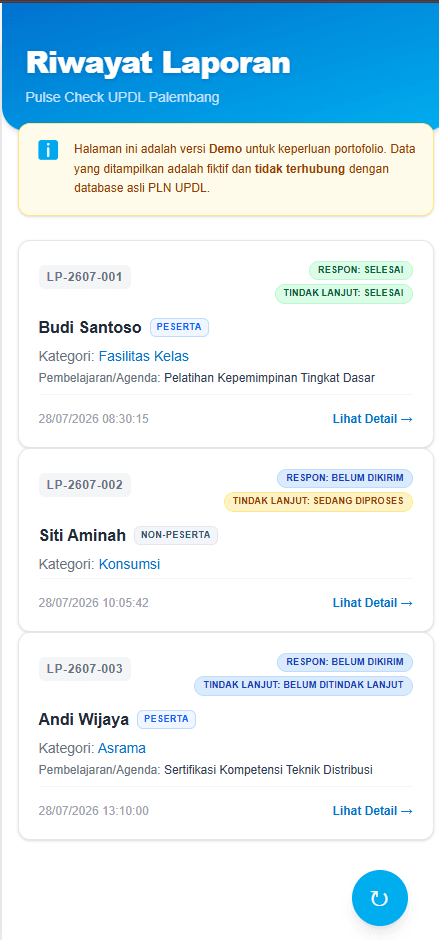
A mobile-first Progressive Web App (PWA) complaint management system. Features include role-based access control (Superadmin/Staff) with PIN security, a Google Sheets backend via Google Apps Script, real-time rich notifications, and automated SLA tracking. Operational smoothness at PLN UPDL Palembang heavily relies on the response speed to broken facilities or service complaints. Delays in handling training facilities don't just disrupt the education of hundreds of PLN employees, but also decrease the efficiency of staff who have to repeatedly verify reports.
The Problem
The existing reporting system was highly passive. Users reported issues through a digital form, but facility admins had no way of knowing a report existed in real-time. This created a long time gap between when an issue was reported and when repairs began, purely due to the admins' lack of awareness.
Existing Workflow
Constraints
- Zero Budget for New Infrastructure: No budget allocated for renting VPS or using paid databases.
- Learning Curve & Habits: The client was highly accustomed to the Google Workspace ecosystem. Changing platforms would cause resistance.
- Admin Accessibility: Facility admins are highly mobile field workers who are rarely in front of a computer.
Stakeholders
- Trainees & Non-Facility Staff: As the issue reporters (End-users).
- Facility Admins & Technicians: System users who receive notifications and perform field repairs.
- Building PIC & UPDL Management: Require recapitulation reports of repair data.
Success Criteria
- Admins receive automatic push notifications directly on their mobile devices when a complaint is submitted.
- Admins no longer need to manually monitor the Google Spreadsheet.
- The workflow from the user's side remains completely unchanged (still scanning QR and using Google Form).
- The management dashboard can be used smoothly and responsively via smartphone.
Before vs After
| Before | After |
|---|---|
| Complaint Detection: Required manual checking of spreadsheets via a computer periodically. | Complaint Detection: Instant push notifications (FCM) directly to the admin's Android smartphone. |
| Status Tracking: Admins had to manually color cells or change text columns in the spreadsheet to mark 'Done'. | Status Tracking: Centralized status management via mobile app (Pending, In Progress, Resolved) with just a button press. |
Complaint Detection: Required manual checking of spreadsheets via a computer periodically.
Complaint Detection: Instant push notifications (FCM) directly to the admin's Android smartphone.
Status Tracking: Admins had to manually color cells or change text columns in the spreadsheet to mark 'Done'.
Status Tracking: Centralized status management via mobile app (Pending, In Progress, Resolved) with just a button press.
Architecture
Google Form
User submits complaints
Apps Script
Triggers on submit & fires webhook
Next.js API
Validates & formats payload
FCM
Routes push notifications
Android App
Admin receives alert on phone
Engineering Decisions
| Decision | Alternatives | Why This Choice |
|---|---|---|
| Keeping Google Form | Building Custom Form (Next.js/React) | We lose full control over the UI, but users were already accustomed to the QR code and existing form. Changing the user-facing form violated the habit constraint. Injecting the system behind the scenes is much more transparent. |
| Google Apps Script Backend | Node.js Server polling API | Adheres to the zero-budget constraint and integrates natively with Google Sheets without requiring complex OAuth flows for the client. |
| Next.js API (Middleware) | Direct from GAS to Notification Service | Normalizes CORS formatting, protects FCM credentials, and provides a strong foundation if the system ever needs to scale into a full SaaS. |
| Firebase Cloud Messaging (FCM) | OneSignal / Telegram API | FCM is free without significant limits, highly battle-tested for the Android ecosystem, and gives full control over push notification behavior compared to a 3rd-party chat bot. |
| PWA + Android via Capacitor | Native Android (Kotlin/Java) / React Native | Allows using the exact same web codebase (React/Tailwind) to compile a lightweight Android app, saving massive development time while still getting native app advantages (FCM & App Icon). |
Trade-offs
While Google Apps Script provided zero operational costs and excellent integration with Google Workspace, it comes with execution limits, daily quotas, and strict concurrency constraints. These trade-offs were accepted because the volume of facility reports is relatively low and predictable, making it a highly effective compromise.
Implementation Details
This project injects a modern stack into a legacy ecosystem. I designed Google Apps Script to read form triggers on-submit, utilizing LockService to ensure safe data queuing, and sending it to a Next.js API. On the admin side, I used Next.js and Tailwind CSS to design a mobile-first dashboard wrapped into an Android app using Capacitor. This allows admins to install the app, login with a secure PIN, and instantly receive push notifications via Firebase Cloud Messaging.
Challenges
The biggest challenges were engineering constraints rather than just coding. When multiple forms are submitted simultaneously, Google Apps Script risks race conditions. I utilized LockService.getScriptLock() to create a reliable queuing mechanism. Additionally, debugging the webhook payload sent from Google's closed network to Vercel (Next.js) was difficult due to GAS's limited built-in logging. Finally, bridging Firebase push notifications with the web service worker inside the Capacitor wrapper required very specific AndroidManifest configurations and client-side token synchronization.
Gallery
Business Impact
The presence of the Android app allowed admins to receive notifications instantly. Staff can respond to facility incidents faster, directly improving the operational service quality of training at PLN UPDL Palembang. Ultimately, the biggest operational gain came from eliminating the need for repetitive manual monitoring of spreadsheets.
Technical Achievement
Successfully implemented a reliable event-driven notification architecture using zero infrastructure cost, while delivering a polished mobile-first administration experience that bridges legacy spreadsheets with modern native capabilities.
Lessons Learned
This project shifted my mindset as a Software Engineer. Initially, I thought building everything from scratch with the most modern tech stack was always the best path. Working within PLN's environment taught me that the best engineering solution is the one that respects existing workflows, minimizes user friction, and fits business constraints. Choosing not to replace their Google Form to preserve the reporters' comfort was the most crucial UX decision of this project.
What I Would Do Differently Today
If I were to build this today, I would consider a domain-driven folder structure for scalability and implement better observability. I would use stronger authentication than a static PIN, add offline synchronization, and introduce proper logging. Additionally, I would plan a gradual migration to PostgreSQL for when the data volume inevitably hits Google Sheets' limits.